01 · Quick start
Getting started with BallistiSCAN V3
Walks through the contents of the field case: sensor discs, mounting brackets, cabling, alarm tower, and controls. Start here on day one.


Support · BallistiSCAN · V3
Training footage and reference documents for fielded BallistiSCAN V3 units. BallistiSCAN is plug-and-play — the unit auto-calibrates to the doorway on power-up — so these videos are for operators who want a deeper understanding of setup, placement, threshold behavior, and field use. The V3 operator's manual, comparative sensing chart, and nine training videos are below.
Two-page product specification with the full technical profile, sensor geometry, power, connectivity, and deployment context.
Download PDFFull operator's reference for the current production unit. Setup, calibration, alarm thresholds, maintenance.
Download PDFHow BallistiSCAN's ferromagnetic sensing compares to the conventional walk-through category on key criteria.
View chart belowBallistiSCAN is designed to be stood up by the operator — power on, and the unit calibrates itself to the environment. No on-site technician or factory tuning visit required.
Email support@ballistiglass.comTraining video library
Short-format training originally produced for the BallistiSCAN University onboarding program. Watch in any order. Videos play inline below.
01 · Quick start
Walks through the contents of the field case: sensor discs, mounting brackets, cabling, alarm tower, and controls. Start here on day one.
02 · Deployment
How to choose the doorway, place the sensors, and position the lane for reliable passive reading.
03 · Sensor setup
Fine-tuning sensor position, alignment, and separation for the target entrance geometry.
04 · Alarm threshold
How the auto-calibrated threshold behaves, and how to read it against the site's risk profile and expected foot traffic.
05 · Reading the values
How the unit’s auto-calibrated values present on screen, and how to read them for your site.
06 · Ferromagnetic detection
The physics of the passive sensing element. Why it reads ferromagnetic mass, what that covers, and what it does not.
07 · Science
A deeper look at the measurement principle and why puck-sized sensing is enough to cover a doorway.
08 · Use cases
School entries, houses of worship, healthcare lobbies, memorials, and government receptions. Where puck-sized sensing fits.
09 · Edge cases
Working example of a specific detection scenario encountered in the field, and how the unit responds.
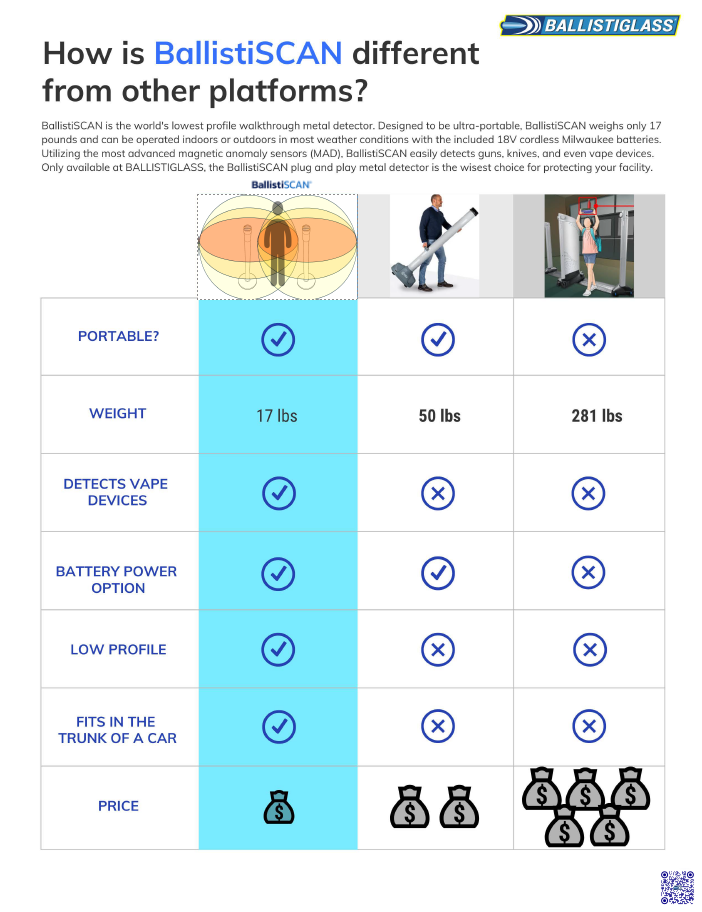
Comparative sensing chart
A side-by-side reference of BallistiSCAN's passive ferromagnetic sensing versus the conventional walk-through category. Use this as a starting point for specifying against an RFP.
Setup, threshold behavior, replacement parts, or a question the videos and manual do not cover. Reach the support team and an associate will respond within one business day.